
MCSC Minecraft Skin Creator
7740°
<minecraft-skin-flux2>
Apps that support ModelTrends tags let you run/install models by copying this code in your prompt with no setup. Look for our icon in apps that support it, like Prism (below).

Run this model
Offers / Ads

Easy Creator (Prism) Web
Unlimited · flat fee
Best for beginners. Describe what you want in a chat and the picture comes back, no learning curve.

PirateDiffusion Telegram
Unlimited · flat fee
Images and video from a chat, with short commands. The most convenient tool for Telegram users, with a web companion.

Pro studio (SpyGlass) Web
Unlimited · flat fee
Best for power users. Full control over models, settings and workflows in a browser studio.

Discord bot (Vector)
Unlimited · flat fee
Best for communities. Add it to your own server and run any workflow from a channel.

Unified Editor Web
Unlimited · flat fee
One screen for every model and workflow: prompts, references, edits and video, built into your Graydient account.

Civitai Web
Pay per use
Generate on Civitai's own site; every image is paid for with Buzz credits.

Local apps
Requires setup
Set up local programs if your computer has capable hardware.

ModelDuel Web
Pay per use
Generate the same prompt on up to 50 checkpoint/base models at a time.


by Hex_Duck - MCSC - Minecraft Skin Creator
Creator notes
🌌 MCSC
This LoRA is designed to generate high-quality Minecraft skins with exceptional accuracy, converting characters or people into clean and usable 64×64 texture maps.
🧩 Recommended Settings (Qwen)
-
Trigger Word: MCSC:
-
Strength: 0.75 - 1.3
-
Resolution: 512x512
-
Recommended Samplers: Euler Ancestral, DDIM
🧩 Recommended Settings (Flux)
-
Trigger Word: MCSC:
-
Strength: 1.2 - 1.5
-
Resolution: 512x512
-
Recommended Samplers: Euler Ancestral, lcm, Sa_solver, Er_sde
💡 Recommended Prompts:
IMG2IMG
MCSC: transform this into a 64x64 Minecraft skin texture with aligned UV layout, strict pixel grid, hard edges, consistent and coherent pixel placement across all body parts.
TXT2IMG
MCSC: 64x64 Minecraft skin texture with aligned UV layout, strict pixel grid, hard edges, consistent and coherent pixel placement across all body parts,
📅 Planned Releases & Roadmap ・V4
🟢 MCSC V4 IMG2IMG · QIE 2511 (Released)
-
Architecture: Full inner / Full outer layer training
-
Dataset: 200 image pairs
-
Note: Highly complex outer layer structures can occasionally produce scattered pixels, artifacts, or color bleeding, which can be removed using the MCSC viewer to achieve higher quality.
🟡 MCSC V4 TXT2IMG · QWEN (Coming Soon)
-
Architecture: Full inner / Head Only Outer layer training
-
Dataset: 200 image pairs
-
Note: Exclusive version for txt2img, likely less prone to errors.
🧑🎮 MCSC Viewer
The generated skins need to be processed to correct imperfections, and they include a purple mask that must be removed to be used correctly in Minecraft. That said, I developed MCSC VIEWER, an all-in-one solution that gives you total control over skin processing, which outlayers to keep, and much more!
Features
-
Automatic purple mask removal
-
Alpha transparency restoration
-
Precision 64×64 resizing
-
Interactive 3D preview
-
Steve and Alex model support
-
One-click PNG export
-
Outer Layer Control
-
And much more !!
Links:
Viewer (One click use - online):
GitHub:
📋 DEV NOTES
Two fresh new versions of MCSC are finally here for you all!
These versions took a tremendous amount of work to develop and test. After roughly a week of experimentation, iteration, and troubleshooting, I finally reached a level of quality that I consider usable. Honestly, I still think these releases are quite far from what I originally envisioned for them, but given my current hardware limitations, I believe this is the best result I can realistically achieve for now.
With that said, let's go over the technical changes introduced in this release.
Flux Klein 9B VS Qwen Image Edit 2511
Overall, Qwen Image Edit performs better at generalization and detail generation, often producing skins with richer details and more complex visual features. On the other hand, Flux Klein frequently generates cleaner and simpler skins with fewer visible imperfections and artifacts.
After extensive testing, I personally prefer the results produced by Qwen Image Edit. The additional detail, stronger concept understanding, and greater flexibility make it my preferred choice in many situations. However, this does not mean it is universally better than Flux Klein.
In practice, the differences between the two models vary significantly depending on the character, prompt, and generation scenario. While Qwen Image Edit tends to produce more detailed results on average, Flux Klein often delivers cleaner, and simpler skins
For that reason, I strongly recommend trying both versions and deciding for yourself which one better fits your workflow and preferred style. Despite their differences, both models are exceptionally capable at what they do.
MCSC Viewer
The real big changer of this release.
While the new Qwen Image Edit versions bring interesting improvements and new possibilities, the MCSC Viewer is, in my opinion, the feature that truly transforms the overall user experience.
The Python script I previously provided was extremely simple, difficult for non-technical users to operate, and often produced inconsistent or messy results because it lacked the fine-grained controls needed to properly process different skins.
MCSC Viewer changes that completely. It provides a full set of tools and configuration options specifically designed for Minecraft skin post-processing, allowing the cleanup workflow to be performed quickly and largely automatically.
Thanks to this tool, the vast majority of generated skins can now be converted into game-ready assets with little to no manual correction required. What previously required external scripts, manual editing, and trial-and-error can now be handled through a much more accessible and user-friendly workflow.
More than the new LoRAs themselves, I believe MCSC Viewer is the feature that will have the biggest impact on the quality and usability of the final results.
Future Development
With the release of these two Qwen Image Edit LoRAs, I plan to enter another development hiatus for this project.
Future work will likely resume only when either:
-
A new model worth training becomes available.
-
I gain access to better hardware.
-
I secure funding for more extensive training experiments.
Commercial Usage
This project was created as an open and freely accessible resource for the community. While I cannot prevent commercial usage, I strongly encourage anyone building upon this work to provide proper credit and include a link to this page. If your project directly relies on this LoRA, please acknowledge the original source and contributors.
Final Notes
With all that said, I truly hope you enjoy these new versions.
They required an enormous amount of work, and I created them with a lot of care and passion for the community. I will continue releasing my usual LoRAs on my profile, and I already have plenty of exciting projects planned for the coming months.
If you enjoy my work, I would greatly appreciate it if you could:
-
Share the project
-
Leave a like
-
Comment your thought
Trigger words
MCSC: 64x64 Minecraft skin texture with aligned UV layout, strict pixel grid, hard edges, consistent and coherent pixel placement across all body parts,
SHA256
60EABC82799720CB1119B375C28D7E9D4D1D2B749F338B69BDC062561893E5B5
Ranking badge
Updated Oct 22, 2026

Made this model? Show this badge on your page.
Paste it into your Hugging Face card or Civitai description.
MCSC Minecraft Skin Creator Popularity Trend
Heat score since 6 Apr 2026
Heat score
7,740°
This week
n/a
Wasn't released/tracked
This month
n/a
Wasn't released/tracked
Past year
n/a
Wasn't released/tracked
7,000°
Floor
The scale runs from 0° to 9,999°. Everything below 7,000° is kept for models no source reports on yet, which carry a stand-in number there so lists stay complete. 7,000° is where measured data begins: a model with real data but almost no downloads sits at the floor, and the measurements fill the degrees above it. The floor says nothing about the model; only the degrees above it do, and they are what separates one model from another.
+698°
Civitai downloads
207 downloads of this exact version on Civitai. Downloads are the heaviest ingredient and are counted on a log scale: ten times the downloads adds the same 300°, so a model with a million downloads is not a thousand times hotter than one with a thousand. The six download sources share that one term, split between them in proportion to their counts.
+185°
Likes
16 likes and thumbs up across the sources. A like weighs half a download, on the same log scale.
+3°
Adoption rate
About 0 downloads a day, measured between two readings of the sources, never guessed from a lifetime average. Speed weighs a quarter of the download term, so a fresh surge shows without letting a one-day spike outrank years of use.
−146°
Age
−146° because the Flux2 weights came out in 2025. Every model inherits the age of the weights it is built on: 150° a year, up to 750°, and it keeps growing until then. Without it the top of the list would be 2022 and 2023 checkpoints on the strength of downloads that had years to pile up.
Show detailed breakdown
Every number on this site can be checked. This model's heat score is 7,740°, and here it is built one ingredient at a time, with the running total after each: the floor, the degrees each source adds, the bonus for the kind of model and what the age of its weights takes away. The colors are the bands of the chart above. The glossary at the end defines every term.
- 1Start at the floor.Why 7,000° and not zero: the scale runs from 0° to 9,999°, and the part below 7,000° is reserved for models no source reports on yet, which carry a stand-in number there so the lists stay complete and never outrank a model with data. 7,000° is where measured data begins. A model with real data but almost no downloads sits here; everything that follows is measurement, and the room above the floor holds ten tenfold steps in downloads at 300° each. The floor is the same for every model, so it decides nothing; the degrees above it do.7,000°running total
- 2Add the downloads.207 download-equivalents in all, from Civitai downloads. Ten times the downloads adds the same 300°, so size matters but never runs away with the score.+698°7,698°running total
- 3Add the likes.16 likes and thumbs up, at half the weight of a download.+185°7,883°running total
- 4Add the adoption rate.About 0 downloads a day right now, measured between two readings, at a quarter of the weight.+3°7,886°running total
- 5Take off the age.The Flux2 weights came out in 2025: 150° a year, up to 750°, growing until then.−146°7,740°running total
- =The heat score.Where this model stands on every list of this site. Nothing else adjusts it.7,740°
Glossary: the terms used here
- Heat score
- One number for how much a model is used and wanted right now, from 0° to 9,999°. Every list on this site that says hottest is sorted by it and nothing else.
- Floor
- The 7,000° every model with real data starts from. The scale runs from 0° to 9,999°; the part below the floor is reserved for stand-ins (models without data), so that a model with data always ranks above one without. The floor is the same for everyone and decides nothing; the degrees above it are the measurement.
- Download-equivalents
- Everything the score treats as a download, added up: downloads themselves, each torrent seeder as 1,000, each AI Horde image and each run on a generation site as one.
- Log scale
- Counting by tens, not by ones: going from 1,000 to 10,000 downloads adds the same degrees as going from 10,000 to 100,000. It keeps giants from crowding out everything else.
- Likes
- Thumbs up and likes from every source, worth half a download each on the log scale.
- Adoption rate
- How many downloads a day a model gets right now, from the difference between two readings of a source. A quarter of the weight of the download term.
- Measured and estimated
- Measured means two readings of a source exist and the difference is real. Estimated means only today's total is known and the past is spread over the model's life; the site says which one it is showing.
- Seeder
- Someone who keeps a copy of the weights online for others to download over a torrent, or a hosted mirror doing the same. Each one counts as 1,000 downloads.
- AI Horde
- A volunteer network that generates images for free on donated computers. The number of images it has made with a model is public, and each counts as one download.
- Generation sites
- Sites that host their own copies of a model and let people generate with it, such as PixAI, SeaArt and Yodayo. Their downloads count like Civitai's and each generation run as one download.
- OpenRouter tokens
- A text model served through an API, such as Claude or GPT, has no weights to download, so its usage is measured in tokens: the pieces of text it read and wrote through OpenRouter, a gateway many apps use, over the last 30 days. Every 10,000,000 tokens count as one download. Source: OpenRouter (openrouter.ai/rankings), CC BY 4.0.
- Full model (checkpoint)
- The weights themselves, the file that generates on its own. It gets a bonus because add-ons depend on it.
- LoRA and embedding
- Small add-on files that steer someone else's weights toward a style, a character or a concept. They cannot run alone.
- Family and weights
- The base a model is built on, such as SD 1.5, SDXL, Flux or Wan. Every model inherits the release date of its family's weights.
- Age
- Degrees taken off for how long ago the family's weights came out: 150° a year, up to 750°. It keeps old downloads that had years to pile up from freezing the top of the list.
- Family boost
- A small, bounded nudge for LoRAs of a family this site is pushing forward right now, always listed in the breakdown.
- Stand-in score
- A stable number below the floor given to a model no source reports on yet, so lists stay complete. It never ranks above a model with data.
- New! (grace period)
- A model less than 7 days old shows New! instead of a score and holds no place in the rankings. Its score is computed from day one, but a model one day old grows faster than anything, so without the wait the week's #1 would always be whatever came out yesterday rather than what held up for a week.
- Trend
- How a model's growth over a period compares with the typical model's growth over the same period. Faster than typical reads as a rise, slower as a fall.
- Typical model
- The middle of the catalog: half the models with a figure grew faster over the period, half slower.
How this model's popularity has moved against the rest of the catalog: its growth in downloads, likes and usage over each period, measured against the typical model's growth over the same period, with its heat score at the time. Above the typical growth reads as a rise, below it as a fall. The past is reconstructed from today's totals, the model's first day and its measured download speed where two readings exist; a model that did not exist at the start of a period shows n/a.
Example renders
Prompts and settings shared by the people who made these renders on Civitai. Pick a render to see how it was made.
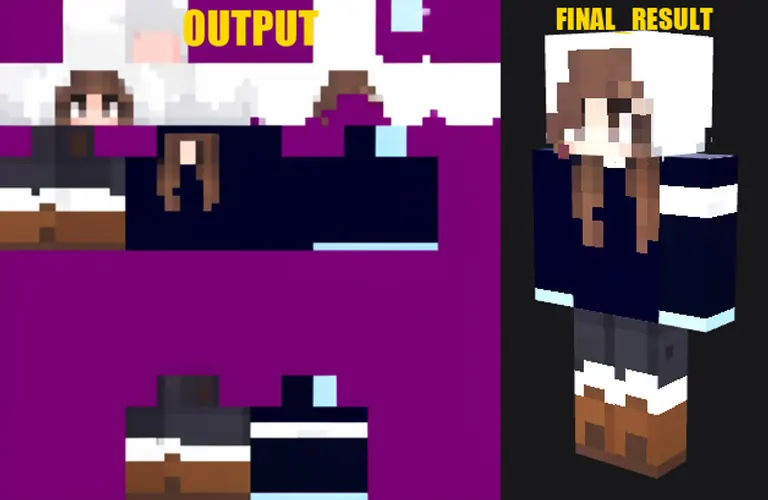
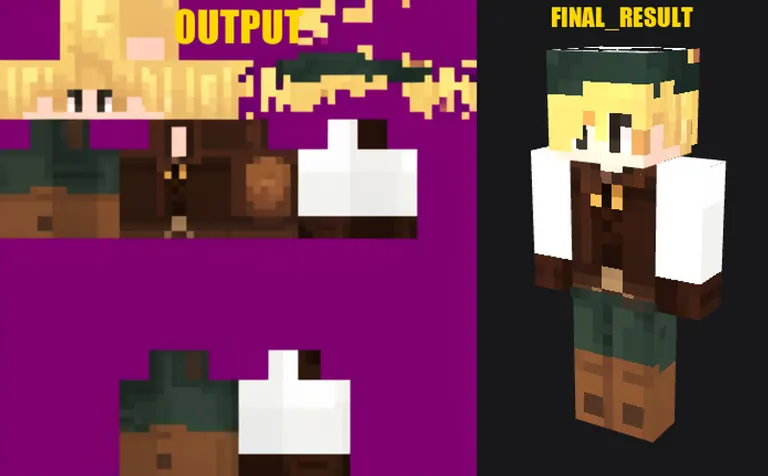

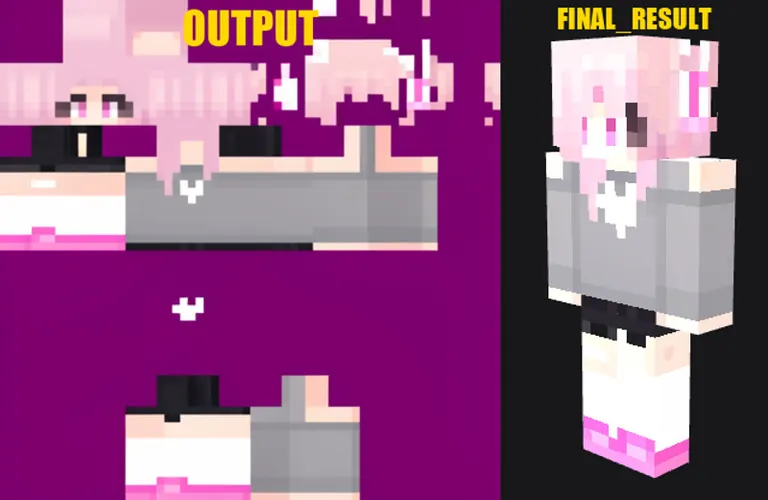

No prompt was shared with this render.
No prompt was shared with this render.
No prompt was shared with this render.
No prompt was shared with this render.
Run Locally
How to install

How to install a LoRA: folders, file checks and first use in ComfyUI, Forge, Automatic1111 and Draw Things
Sep 24, 2025
MCSC_txt2img_v3.safetensors
Downloads are served by Civitai. Some creators ask for a Civitai login first.


![YFG FutureIsDark [Flux | ZIB | Krea2] Flux.2 Dev v1.2](https://media.modeltrends.ai/concepts/40430/thumb_civitai_None.webp)
MCSC Minecraft Skin Creator is a LoRA for the Flux 2 / Klein family listed on ModelTrends.ai, a read-only catalog of open source AI image, video and text models. Compare it with other Flux 2 / Klein models, check its heat score to see how it is trending, and open it on PirateDiffusion or BitVector to try it.
Browse by Model Family

Text / LLM Models
434

Anima Models
528

Chroma Models
19
Fibo Models
2

Flux Models
1,496

Flux 2 / Klein Models
1,239

Flux 3 Models
3

Moss Models
3

Iris Models
1

MiniMax H3 Models
364

Hunyuan Models
204

Ideogram Models
20
Krea2 Models
717

Qwen Models
20

Qwen2 Models
47

Ltx2 Models
153