
Skin11 qwen
8448°
<skin11-qwen>
Apps that support ModelTrends tags let you run/install models by copying this code in your prompt with no setup. Look for our icon in apps that support it, like Prism (below).
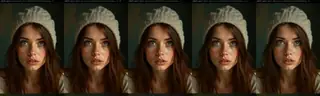
Run this model
Offers / Ads

Easy Creator (Prism) Web
Unlimited · flat fee
Best for beginners. Describe what you want in a chat and the picture comes back, no learning curve.

PirateDiffusion Telegram
Unlimited · flat fee
Images and video from a chat, with short commands. The most convenient tool for Telegram users, with a web companion.

Pro studio (SpyGlass) Web
Unlimited · flat fee
Best for power users. Full control over models, settings and workflows in a browser studio.

Discord bot (Vector)
Unlimited · flat fee
Best for communities. Add it to your own server and run any workflow from a channel.

Unified Editor Web
Unlimited · flat fee
One screen for every model and workflow: prompts, references, edits and video, built into your Graydient account.

Civitai Web
Pay per use
Generate on Civitai's own site; every image is paid for with Buzz credits.

Local apps
Requires setup
Set up local programs if your computer has capable hardware.

ModelDuel Web
Pay per use
Generate the same prompt on up to 50 checkpoint/base models at a time.


qwen-edit-skin v1.1 Trigger words: You should use make the subjects skin details more prominent and natural to trigger the image generation.
Creator notes
Finetuned LoRA for Enhanced Skin Realism in
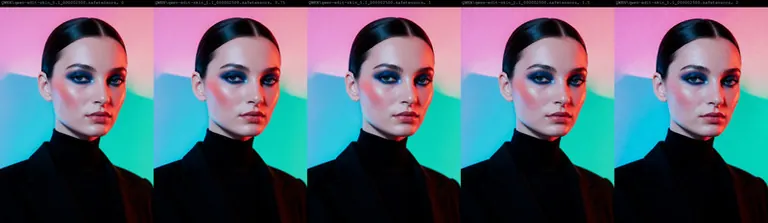
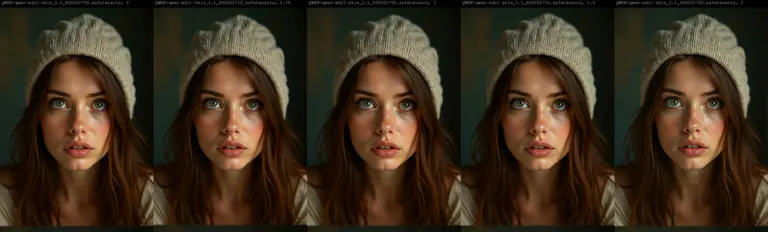
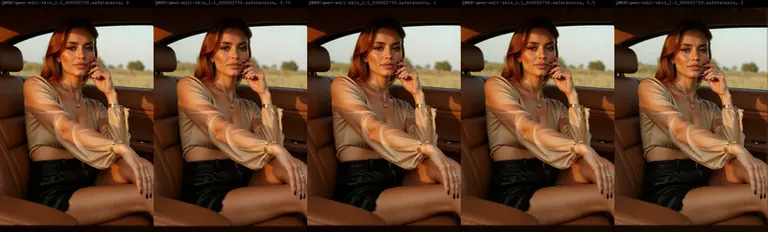
Note: Check the version differences. In Version 1.1 as an example, I've also uploaded previous steps of this version training, so you can download from steps 1750 all the way to 2750 to suit your needs. I attached full comparison images across each LORA and each step count for you to see the sweet spot for your workflows.
You can also download the comparision workflow I made here:
This repository contains a finetuned Low-Rank Adaptation (LoRA) model designed to enhance the realism and detail of human skin in images. The LoRA has been trained on top of the powerful Qwen/Qwen-Image-Edit-2509 model, leveraging its advanced image editing capabilities to focus specifically on generating more natural and detailed skin textures.
This model was trained for 5000 steps on a local RTX 5090 using the AI-Toolkit. The resulting LoRA is ideal for photographers, digital artists, and anyone looking to improve the quality of human subjects in their generated or edited images.
Model Description
The qwen-edit-skin LoRA is a specialized finetuning of the Qwen/Qwen-Image-Edit-2509 base model. The base model is a versatile image editor with strong capabilities in multi-image editing and maintaining single-image consistency, particularly in preserving personal identity. This LoRA builds upon that foundation to specifically address the nuances of human skin, adding detail and realism that may not be present in the original generations.
The training was conducted using this fork of , a comprehensive suite for finetuning diffusion models. The process for curating the dataset involved reverse modification of subject skin details as follows:
-
Taking real images of versatile subject portraits with skin exposed
-
Captioning each of these as our “Target” (THE AFTER) images for the final outcome expected in a standard Qwen Edit workflow
-
Editing the image in Photoshop to add more gaussian blur and smoother skin tones, to make the skin texture, tone and pores less visible
-
These became our “Control” (The BEFORE) images for Qwen Edit training.
Training Details
The model was finetuned with the following key parameters, which can be found in the accompanying config.yaml file:
Hardware:
-
GPU: NVIDIA RTX 5090
Training Configuration:
-
Training Steps: 5000
-
Batch Size: 1
-
Gradient Accumulation: 1
-
Learning Rate: 1.0e-04
-
Optimizer: adamw8bit
-
Noise Scheduler: flowmatch
-
Resolution: The model was trained on a dataset with resolutions of 512, 768, and 1024 pixels.
-
Precision: bf16
Network Architecture:
-
Type: LoRA
-
Linear Rank & Alpha: 16
-
Convolutional Rank & Alpha: 16
The choice of adamw8bit as the optimizer is significant as it reduces the memory footprint of the training process, allowing for more efficient finetuning on consumer-grade hardware without sacrificing performance. The flowmatch noise scheduler is a modern approach that can lead to more efficient training and high-quality image generation.
A notable aspect of the LoRA architecture is that the alpha values for both linear and convolutional layers are set to be equal to their respective rank (16). This balanced approach is a common starting point for LoRA training, ensuring that the learned adaptations are applied with a proportional scaling factor, which can help in preventing overfitting while allowing the model to learn the desired new features effectively.
How to Use
To use this LoRA, you will need to load the base model Qwen/Qwen-Image-Edit-2509 and then apply the finetuned LoRA weights loaded as qwen-edit-skin.safetensors. Previous step versions of the weights are uploaded for reference but the final version is qwen-edit-skin.safetensors. You can also leverage the example workflow attached in the repo for ComfyUI to compare the results across different weights.
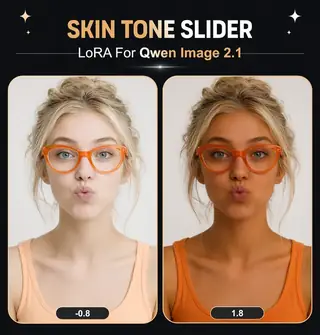
The recommended weight is between 1 and 1.5, the examples provided show weights up to 2 only to show the effect of the Lora with a strength considered too high for effect.
Intended Use
This LoRA is intended for creative and artistic purposes to enhance the realism of human skin in digital images. It can be used by:
-
Digital Artists: To add finer details and textures to the skin of their characters.
-
Photographers: For retouching and enhancing portraits.
-
AI Art Enthusiasts: To generate more lifelike images of people.
Limitations and Bias
This model is a finetuning of a large-scale, pre-trained model and may carry some of its inherent biases. The training dataset for this LoRA was focused on improving skin details and may not represent the full diversity of human skin tones and types equally. Users should be aware of this and use the model responsibly. The output of the model is influenced by the input prompt, and users are encouraged to use descriptive and inclusive language to guide the generation process.
Disclaimer: This model is intended for artistic and creative purposes. Users are responsible for the content they create and should adhere to ethical guidelines and respect the privacy and dignity of individuals.
Trigger words
You should use make the subjects skin details more prominent and natural to trigger the image generation.
SHA256
5EDFE35A85AB1895228AF5D9680EBC0644FC28B0683641969EE65E877F505A25
Ranking badge
Updated Oct 22, 2026

Made this model? Show this badge on your page.
Paste it into your Hugging Face card or Civitai description.
Also ranked: #3 Hottest Qwen model · #2 Hottest Qwen LoRA
Not this creator?
Get your own badge
skin11 Popularity Trend
Heat score since 4 Nov 2025
Heat score
8,448°
This week
▲
0.2%
8,449° then, 8,448° now
This month
▲
0.9%
8,454° then, 8,448° now
Past year
n/a
Wasn't released/tracked
7,000°
Floor
The scale runs from 0° to 9,999°. Everything below 7,000° is kept for models no source reports on yet, which carry a stand-in number there so lists stay complete. 7,000° is where measured data begins: a model with real data but almost no downloads sits at the floor, and the measurements fill the degrees above it. The floor says nothing about the model; only the degrees above it do, and they are what separates one model from another.
+1,198°
Civitai downloads
9,004 downloads of this exact version on Civitai. Downloads are the heaviest ingredient and are counted on a log scale: ten times the downloads adds the same 300°, so a model with a million downloads is not a thousand times hotter than one with a thousand. The six download sources share that one term, split between them in proportion to their counts.
+356°
Likes
234 likes and thumbs up across the sources. A like weighs half a download, on the same log scale.
+78°
Adoption rate
About 10 downloads a day, measured between two readings of the sources, never guessed from a lifetime average. Speed weighs a quarter of the download term, so a fresh surge shows without letting a one-day spike outrank years of use.
−184°
Age
−184° because the Qwen weights came out in 2025. Every model inherits the age of the weights it is built on: 150° a year, up to 750°, and it keeps growing until then. Without it the top of the list would be 2022 and 2023 checkpoints on the strength of downloads that had years to pile up.
Show detailed breakdown
Every number on this site can be checked. This model's heat score is 8,448°, and here it is built one ingredient at a time, with the running total after each: the floor, the degrees each source adds, the bonus for the kind of model and what the age of its weights takes away. The colors are the bands of the chart above. The glossary at the end defines every term.
- 1Start at the floor.Why 7,000° and not zero: the scale runs from 0° to 9,999°, and the part below 7,000° is reserved for models no source reports on yet, which carry a stand-in number there so the lists stay complete and never outrank a model with data. 7,000° is where measured data begins. A model with real data but almost no downloads sits here; everything that follows is measurement, and the room above the floor holds ten tenfold steps in downloads at 300° each. The floor is the same for every model, so it decides nothing; the degrees above it do.7,000°running total
- 2Add the downloads.9,004 download-equivalents in all, from Civitai downloads. Ten times the downloads adds the same 300°, so size matters but never runs away with the score.+1,198°8,198°running total
- 3Add the likes.234 likes and thumbs up, at half the weight of a download.+356°8,554°running total
- 4Add the adoption rate.About 10 downloads a day right now, measured between two readings, at a quarter of the weight.+78°8,632°running total
- 5Take off the age.The Qwen weights came out in 2025: 150° a year, up to 750°, growing until then.−184°8,448°running total
- =The heat score.Where this model stands on every list of this site. Nothing else adjusts it.8,448°
Glossary: the terms used here
- Heat score
- One number for how much a model is used and wanted right now, from 0° to 9,999°. Every list on this site that says hottest is sorted by it and nothing else.
- Floor
- The 7,000° every model with real data starts from. The scale runs from 0° to 9,999°; the part below the floor is reserved for stand-ins (models without data), so that a model with data always ranks above one without. The floor is the same for everyone and decides nothing; the degrees above it are the measurement.
- Download-equivalents
- Everything the score treats as a download, added up: downloads themselves, each torrent seeder as 1,000, each AI Horde image and each run on a generation site as one.
- Log scale
- Counting by tens, not by ones: going from 1,000 to 10,000 downloads adds the same degrees as going from 10,000 to 100,000. It keeps giants from crowding out everything else.
- Likes
- Thumbs up and likes from every source, worth half a download each on the log scale.
- Adoption rate
- How many downloads a day a model gets right now, from the difference between two readings of a source. A quarter of the weight of the download term.
- Measured and estimated
- Measured means two readings of a source exist and the difference is real. Estimated means only today's total is known and the past is spread over the model's life; the site says which one it is showing.
- Seeder
- Someone who keeps a copy of the weights online for others to download over a torrent, or a hosted mirror doing the same. Each one counts as 1,000 downloads.
- AI Horde
- A volunteer network that generates images for free on donated computers. The number of images it has made with a model is public, and each counts as one download.
- Generation sites
- Sites that host their own copies of a model and let people generate with it, such as PixAI, SeaArt and Yodayo. Their downloads count like Civitai's and each generation run as one download.
- OpenRouter tokens
- A text model served through an API, such as Claude or GPT, has no weights to download, so its usage is measured in tokens: the pieces of text it read and wrote through OpenRouter, a gateway many apps use, over the last 30 days. Every 10,000,000 tokens count as one download. Source: OpenRouter (openrouter.ai/rankings), CC BY 4.0.
- Full model (checkpoint)
- The weights themselves, the file that generates on its own. It gets a bonus because add-ons depend on it.
- LoRA and embedding
- Small add-on files that steer someone else's weights toward a style, a character or a concept. They cannot run alone.
- Family and weights
- The base a model is built on, such as SD 1.5, SDXL, Flux or Wan. Every model inherits the release date of its family's weights.
- Age
- Degrees taken off for how long ago the family's weights came out: 150° a year, up to 750°. It keeps old downloads that had years to pile up from freezing the top of the list.
- Family boost
- A small, bounded nudge for LoRAs of a family this site is pushing forward right now, always listed in the breakdown.
- Stand-in score
- A stable number below the floor given to a model no source reports on yet, so lists stay complete. It never ranks above a model with data.
- New! (grace period)
- A model less than 7 days old shows New! instead of a score and holds no place in the rankings. Its score is computed from day one, but a model one day old grows faster than anything, so without the wait the week's #1 would always be whatever came out yesterday rather than what held up for a week.
- Trend
- How a model's growth over a period compares with the typical model's growth over the same period. Faster than typical reads as a rise, slower as a fall.
- Typical model
- The middle of the catalog: half the models with a figure grew faster over the period, half slower.
How this model's popularity has moved against the rest of the catalog: its growth in downloads, likes and usage over each period, measured against the typical model's growth over the same period, with its heat score at the time. Above the typical growth reads as a rise, below it as a fall. The past is reconstructed from today's totals, the model's first day and its measured download speed where two readings exist; a model that did not exist at the start of a period shows n/a.
Example renders
Prompts and settings shared by the people who made these renders on Civitai. Pick a render to see how it was made.



No prompt was shared with this render.
No prompt was shared with this render.
Settings
Sampler
Euler a
Steps
30
Guidance
6
Seed
6565765
Size
2048x2048
Prompt
best quality
Negative prompt
worst quality
No prompt was shared with this render.
No prompt was shared with this render.
Settings
Steps
4
Guidance
1
Size
1472x2160
Prompt
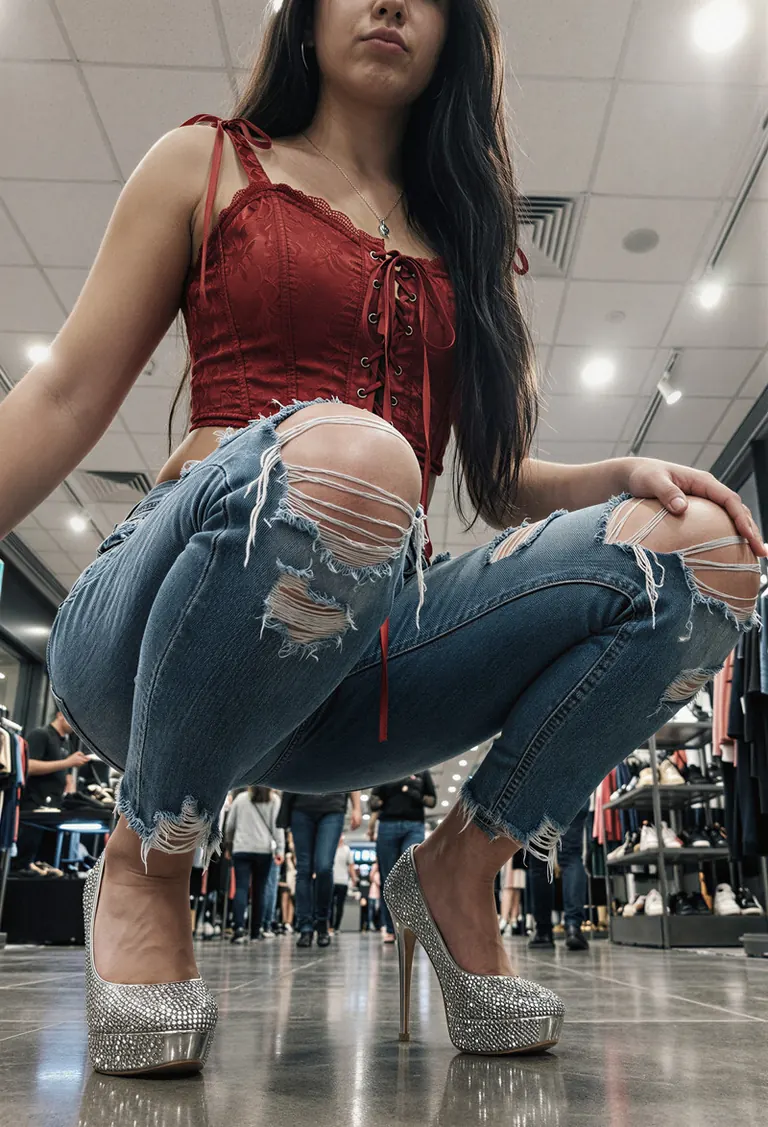
A young woman with long, dark straight hair sits low on a reflective floor in an indoor shopping mall or retail space, her body angled slightly toward the viewer as she crouches with knees bent inward and feet planted firmly apart. She wears a cropped red corset-style top featuring lace-up detailing down the front and tied ribbon straps over each shoulder, paired with heavily distressed light-wash jeans that have large, frayed tears at both thighs. Her footwear consists of sparkling silver platform heels with transparent bases, catching ambient reflections off the polished tile beneath them. The setting includes white ceiling panels illuminated by bright overhead lights casting even illumination across the scene while creating subtle highlights along her outfit’s edges and skin contours; minimal shadowing suggests strong artificial lighting from above. In the blurred background, other shoppers can be seen walking through aisles lined with display shelves holding shoes or apparel, reinforcing the commercial context. The photograph appears to be taken from a very low angle—almost ground level—with tight framing emphasizing her legs, torso, and upper limbs, drawing attention primarily to her fashion-forward attire and confident posture despite being seated rather than standing. There's little discernible facial detail due to cropping near her mouth and chin area, but her lips are pursed faintly suggesting mild self-awareness or playful intent behind the pose. The overall tone feels modern and stylized for social media presentation, prioritizing bold visuals against clean architectural surroundings.
Settings
Size
1472x2160
Prompt
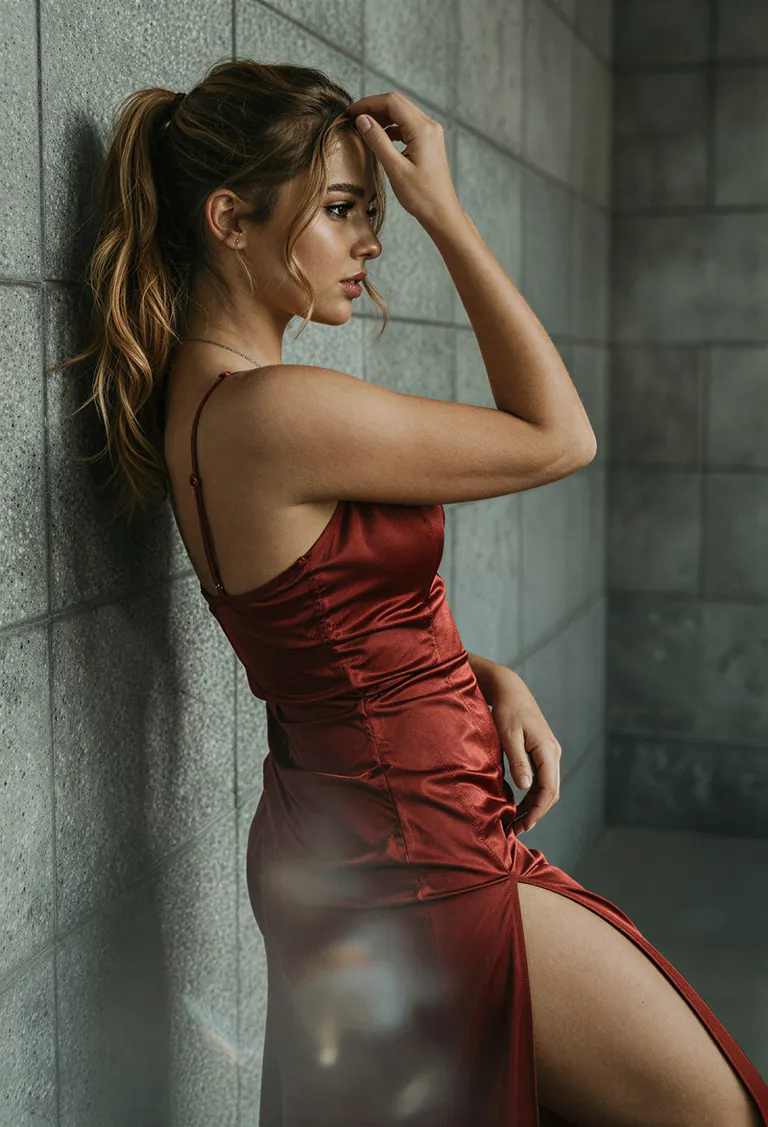
The young 20 years old woman’s hair is a cascade of rich caramel-brown waves, gathered high into an effortless ponytail with loose tendrils framing her cheekbones; the texture suggests silky sheen under studio-grade illumination. Her skin glows with a warm, porcelain tone—smooth yet subtly defined by natural contours. The red gown hugs every curve with precision—a satin-like material reflecting ambient glow along its décolletage and thigh-high slit, where folds ripple as though caught mid-motion. A thin, delicate chain necklace rests at her collarbone, catching glimpses of sunlight off its metallic links while resting against the smooth expanse of exposed backskin. She leans casually against a textured concrete wall composed of large, square tiles speckled with fine aggregate grains, their muted gray palette contrasting sharply with the dress's saturated hue. Light enters from above-left, casting long shadows beneath her arm and accentuating the sculpted arch of her spine—the highlight tracing down to the hemline where fabric drapes over hip bones without clinging or tearing. Her right hand gently brushes through her hair near temple, fingers slightly curled around strands that drape softly over one shoulder. The background recedes evenly behind her form, leaving foreground emphasis on the garment’s fluidity and body silhouette. Shot from a slight low angle, likely via a medium telephoto lens, this image isolates her figure within shallow focus—an ethereal blur enveloping distant walls while sharp detail lingers on lace-up straps, lip gloss gleam, and earlobe stud. Negative space stretches vertically beside her torso, drawing eyes upward toward gaze and downward past the skirt’s edge, creating vertical rhythm anchored only by subtle diagonal motion implied in posture. Depth appears layered but restrained, reinforcing intimacy despite urban backdrop. Reflections shimmer weakly off glossy surfaces nearby unseen—but none distract from the arresting center mass: human grace rendered static yet alive.
Settings
Size
1472x2160
Prompt
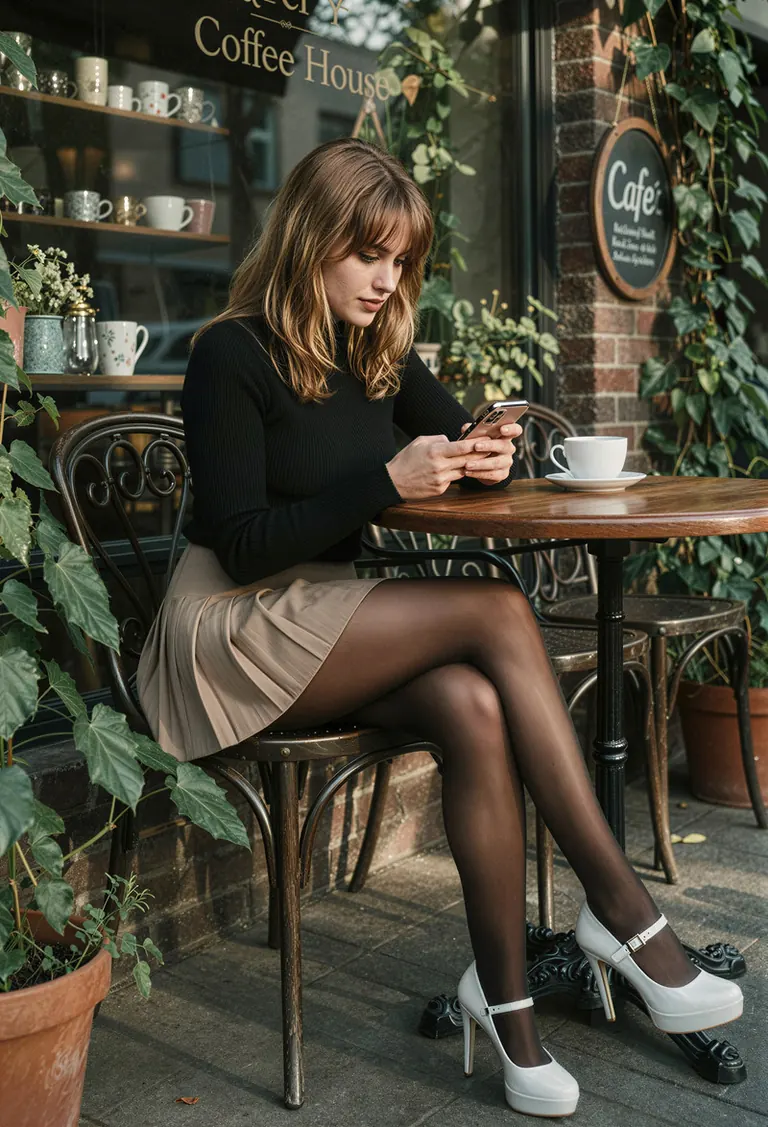
The young woman sits at a wrought-iron café table with glossy black legs that reflect the afternoon sun’s slanted rays; her posture is relaxed yet attentive as she gazes down at her smartphone, its screen glowing faintly against the dimmer ambient light. Her shoulder-length brown hair has subtle wave texture near the ends, catching golden sunlight on one side while casting deeper shadows across the other—her bangs frame delicate cheekbones accentuated by softly defined eyeliner and warm-toned lipstick. She wears a ribbed black long-sleeve top made from fine knit material, showing slight stretch around her arms and shoulders, paired with a beige pleated skirt that hugs her hips snugly before flaring slightly over dark patent leather tights—their smooth surface gleaming where it catches the light. High-heeled platform shoes in white lacquer dominate her silhouette, their metallic buckles glinting under direct illumination, contrasting sharply with the matte finish of her sheer stockings. The chair beside her features ornate scrollwork along its backrest and seat rails, polished to mirror-like shine, resting atop terracotta-colored potted plants whose broad leaves cast dappled shadows onto nearby brick walls. Behind her, large glass windows display “Coffee House” lettering in bold serif font above shelves stocked with ceramic mugs and decorative items—a circular chalkboard sign reading "Café" hangs crookedly to the right, adding an informal charm. Sunlight filters through hanging vines outside, creating dynamic stripes on the sidewalk and wall surfaces, enhancing contrast between illuminated zones and deepened recesses within the storefront's interior architecture. A single white coffee cup rests untouched on the wooden tabletop, positioned diagonally relative to her body, drawing attention to the asymmetrical balance created by her seated form. From this low-angle viewpoint, foreground elements like flower pots and chair feet anchor stability, while background signs recede into atmospheric haze, lending dimensionality without overwhelming focus. Shadows are elongated but softened due to diffuse daylight streaming horizontally across the scene—an effect amplified by the shallow depth-of-field rendering only immediate objects crisply detailed versus blurred surroundings beyond two meters away.
Run Locally
How to install

How to install a LoRA: folders, file checks and first use in ComfyUI, Forge, Automatic1111 and Draw Things
Sep 24, 2025
1.1 Other Steps.zip
qwen-edit-skin_1.1_000002750.safetensors
Downloads are served by Civitai. Some creators ask for a Civitai login first.



Skin11 qwen is a LoRA for the Qwen family listed on ModelTrends.ai, a read-only catalog of open source AI image, video and text models. Compare it with other Qwen models, check its heat score to see how it is trending, and open it on PirateDiffusion or BitVector to try it.
Browse by Model Family

Text / LLM Models
434

Anima Models
528

Chroma Models
19
Fibo Models
2

Flux Models
1,496
Flux 2 / Klein Models
1,239

Flux 3 Models
3

Moss Models
3

Iris Models
1

MiniMax H3 Models
364

Hunyuan Models
204

Ideogram Models
20

Krea2 Models
717
Qwen Models
20
Qwen2 Models
47

Ltx2 Models
153